What Is an AI Voice Agent? (And What It Isn't)
An AI voice agent is software you direct by voice to do real work in your apps, not a call-center voicebot. What it is, what it isn't, what it does on a Mac.
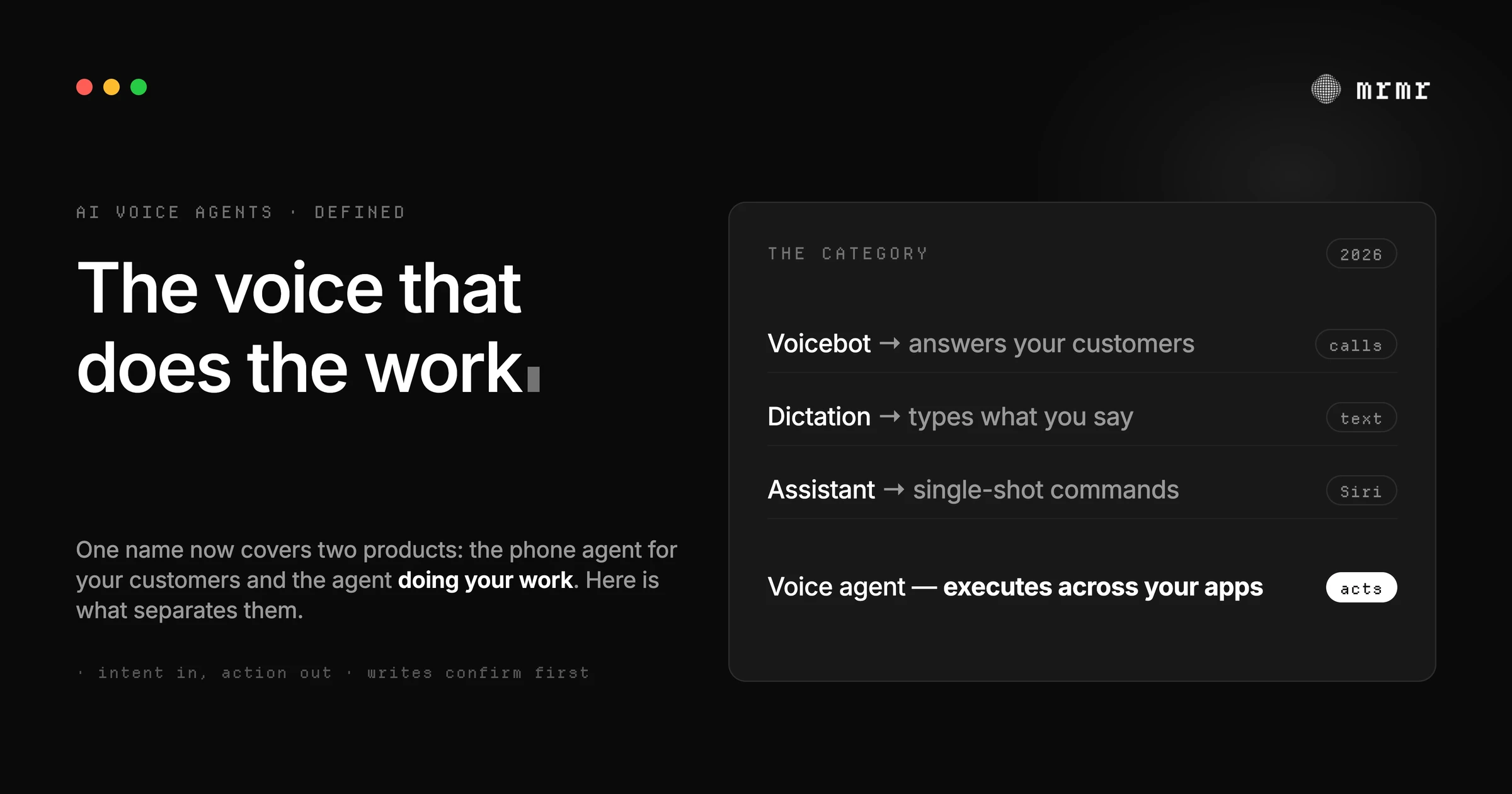
TL;DR: An AI voice agent is software you direct with your voice to complete real tasks in real systems: it listens and talks, works out what you mean, and executes the actual steps through your apps, files, and tools, with a person confirming the consequential ones. In 2026 the term exploded, and two very different products now hide underneath it. One is a phone agent that answers your customers’ calls. The other is an agent that does your work on your computer. This piece defines the second one precisely: what it is, what it isn’t, what it can actually do on a Mac today, and how to tell a real one from a rebranded voicebot.
“AI voice agent” went from niche jargon to one of the fastest-growing terms in AI searches over the course of 2026. That usually means a category is being born. It also means the word is about to be stretched over whatever product wants to wear it, the way “AI assistant” got stretched over everything from a chat window to a thermostat.
So the definition matters right now, because you’re about to be sold several different things under one name. A platform that answers your restaurant’s phone at 2am calls itself a voice agent. So does software that sends your Slack messages and files your tickets because you asked out loud. Only one of them can do your job.
This article is about the second kind: the AI voice agent that works for you, on your computer, across the apps you already use. Here is what it is, what it isn’t, and what it can genuinely do today.
What an AI voice agent is
An AI voice agent is software you direct with spoken language to complete real tasks in real systems. Three properties make it an agent rather than a voice feature:
It speaks and listens like a colleague, not a command box. You hold a key and talk in sentences, including half-formed ones. It talks back, asks when your instruction is ambiguous, and handles you interrupting it mid-task. The newest voice models are full-duplex: they listen and speak at the same time, so the conversation works the way conversations actually work. OpenAI’s own developer documentation now describes voice agents this way: “users ask questions and complete tasks by speaking with your application,” with the design question being how speech connects to reasoning and tools.
It works out what you mean, in your context. “Tell the design channel the review is done” requires knowing which app is a channel in, which channel “the design channel” is, and what “done” refers to. An agent resolves your words to the actual entities in your workspace: the real channel, the real project, the real person. That resolution step is what separates an agent from a voice remote control that triggers predefined commands.
It executes, and the system ends up changed. The output of an AI voice agent is not text on a screen. It is a sent message, a moved meeting, a filed ticket, a completed reminder, a script that ran. The loop closes in your actual tools, through their APIs, not by mimicking keystrokes.
Put together: you speak an intent, the agent resolves it against your real workspace, does the work through real integrations, and tells you what happened. The parts in between are the interesting part, and we’ll come back to them.
Why the term exploded in 2026
The category got its proof points in twelve months, from every direction at once:
- OpenAI shipped agentic ChatGPT in July 2025: an agent that works on its own virtual computer and, in the company’s words, “requests permission before taking actions of consequence.” In July 2026, ChatGPT Voice reached the desktop app, letting you start and steer those agents by voice.
- Google brought Gemini Spark to the Mac in July 2026: a persistent agent that acts across your digital life, with local-file and desktop workflow automation, at $100 a month through Google AI Ultra in a US-only beta.
- Apple introduced Siri AI at WWDC on June 8, 2026: a rebuilt, conversational Siri with personal context and onscreen awareness, integrated into Spotlight and systemwide context menus on the Mac, with Craig Federighi framing it as helping “users take action across apps more naturally than ever.”
- Open-source agents moved onto the desktop too: frameworks like OpenClaw turned Mac minis into personal agent hosts, with the operator approving what the agent may execute.
Four companies with four different architectures all converged on the same sentence: say what you want, and the computer does it. “AI voice agent” is the name the market reached for, which is why search volume for the term went vertical this year.
What the term usually means right now: the call center
There’s a catch. Search “AI voice agents” today and most of what you’ll find is a different product wearing the same name: platforms that answer and make phone calls at scale. ElevenLabs markets voice agents that “resolve calls” across phone, web, and your contact center. Others sell no-code phone agents for inbound and outbound calls, enterprise contact-center deployments, and phone support automation for clinics, law firms, and hotels.
That’s a legitimate and large category: it replaces IVR menus and hold queues for a business’s customers. OpenAI’s developer docs serve it too, with architectures for building voice agents into your own application.
But a call-center voicebot and a personal voice agent are shaped by opposite requirements. The voicebot handles your customers, by phone, inside one scripted domain, optimized for volume and cost per call. A personal AI voice agent handles your work, inside the messier surface of all your apps at once, optimized for getting real tasks done correctly with you in control. The rest of this piece is about the second one.
The four things an AI voice agent is not
Not dictation. Dictation converts speech into text; it stops at the cursor. A voice agent converts speech into actions: “send deploy complete to the engineering channel” ends with a message sent, not the sentence typed into a box. Dictation is a great feature, and a crowded one; it is not agency.
Not a voice assistant, in the Siri sense. The classic assistant takes single-shot commands against app-specific surfaces: set a timer, play a song. Even Apple’s rebuilt Siri AI leads with conversation, personal context, and onscreen awareness; its actions run through system surfaces like Spotlight and context menus. That’s a big step, and it’s still an assistant-first design: the conversation is the product, and the actions ride along. An agent-first design starts from the task and treats conversation as the control channel.
Not a chatbot with a microphone. Add speech input to a chat window and you get spoken answers, which is useful, but nothing outside the chat window changes. The test is simple: after the exchange, what state changed? If the answer is “the transcript,” you talked to a chatbot.
Not a phone agent pointed inward. The call-center voicebot serves your customers. It’s not built to hold the context of your projects, your calendar, and your files, and it isn’t trying to.
What one actually does on a Mac today
The consumer/desktop version of this category exists now, with real differences between the players:
ChatGPT agent works on OpenAI’s own virtual computer, browsing and running code there, with the model trained to ask permission before consequential actions and certain tasks like sending email requiring active oversight. It’s powerful, and it lives inside ChatGPT rather than across your desktop’s apps.
Gemini Spark is Google’s persistent agent for your digital life, arriving on macOS with local-file and workflow automation under your direction. It runs in the cloud, not on your machine.
Siri AI brings conversation, personal context, and onscreen awareness to the Mac through Spotlight and context menus, in beta on recent Apple Silicon, English first. Its action surface grows with the platform.
OpenClaw is the open-source path: a personal agent framework you host and configure yourself, where shell execution is gated by exec approvals bound to exact commands, tuned for people who want to build the agent themselves.
mrmr is the system-wide, integration-native version: a voice agent for Mac that works across the apps you already have open. Agent Mode acts today across twelve managed OAuth connectors (Slack, Linear, Google Calendar, Google Tasks, Google Meet, Zoom, Notion, Gmail, Cal.com, Calendly, Attio, and GitHub) plus local Apple Reminders, runs built-in web search and on-Mac file and browser tools, reads your screen when you ask about what you’re looking at, runs your own scripts (Raycast script commands import as-is), and hands longer jobs to background sub-agents. Reads run freely; anything that writes waits for your confirmation.
The pattern across all of them: the voice is the front door, and the product is what the agent is allowed to do and how it asks.
The anatomy: from spoken sentence to done
Five steps turn “reschedule the demo and tell the room” into a moved event and a sent message:
- Capture the intent. Speech in, meaning extracted, mid-sentence corrections handled. Full-duplex voice means you can keep talking while it works.
- Resolve the specifics. “The room” becomes the actual calendar event’s actual attendees. Name resolution against your real workspace is where agents quietly earn or lose trust.
- Act through the app’s own API. The agent calls Slack’s API to send, the calendar’s API to move. Integration-native action is faster and more reliable than driving the interface, and it fails loudly instead of clicking the wrong thing.
- Confirm the consequential part. Moving a meeting that ten people attend deserves a checkpoint. This is the step that separates agents you can trust from agents you babysit, and it’s where design quality lives: what gets confirmed, what you see before approving, and where the gate is enforced. We go deep on this in our field guide to how voice agents confirm actions.
- Verify and report. The agent checks the result and tells you what happened, so you’re not left wondering. OpenAI’s own voice-agent documentation tells builders to “verify that spoken confirmations match completed actions,” which is the same bar from the other side.
Two failure modes matter at steps 3 and 4. An agent that executes through injected content can be steered by what it reads, which is why indirect prompt injection is the standing threat to any agent that browses or reads untrusted text. And an agent whose confirmations live only in its instructions can skip them, because language models are non-deterministic. The gate has to live below the model.
How to tell a real one from a rebranded voicebot
Five questions, each answerable in one sentence by any honest product:
- Where do actions execute? Through the apps’ real APIs, or by scraping and clicking a browser?
- What gets confirmed, and where does the gate live? Consequential writes should confirm, reads shouldn’t, and the gate should be enforced by the application, not by the model’s good intentions.
- What does it reach? The apps you actually work in, or a demo environment?
- Can it work in the background? Longer tasks need sub-agents that pause for approval on writes instead of either running wild or doing nothing.
- What happens to your audio? Where speech is processed, what’s stored, and whether the mic is ever on when you didn’t trigger it.
If a product answers all five with specifics, you’re looking at a voice agent. If it answers with a demo video, you’re looking at marketing.
The bottom line
An AI voice agent is software you direct by voice to complete real tasks in real systems, with a person confirming the consequential ones. The term took off in 2026 because OpenAI, Google, Apple, and a wave of open-source builders all shipped pieces of that sentence in the same year. But the name now covers both the phone agent answering your customers’ calls and the agent doing your work on your Mac, and they are different products with different standards. The one that works for you should be judged on the questions above: where it acts, what it confirms, where the gate lives, what it can reach, and whether it respects that your voice, your calendar, and your messages are yours.
Sources
- Apple, Apple introduces Siri AI, a profoundly more capable and personal assistant (June 8, 2026). Announces the rebuilt Siri AI with personal context, onscreen awareness, Spotlight and context-menu integration on Mac, and systemwide app actions.
- OpenAI, Introducing ChatGPT agent: bridging research and action (July 2025). Defines the agentic ChatGPT model: permission before consequential actions, active oversight for critical tasks, and explicit confirmation as a prompt-injection mitigation.
- OpenAI, Voice agents (developer documentation). Defines voice agents as applications users speak with to complete tasks; documents full-duplex voice (GPT-Live), architectures connecting speech to reasoning and tools, and guidance to verify spoken confirmations against completed actions.
- ElevenLabs, Conversational AI Platform (product page). Representative of the call-center usage of “voice agents”: agents that answer and resolve customer calls across phone and web, with telephony and CRM integrations.
- 9to5Google, Gemini app for Mac adding ‘Spark’ agent and voice control this summer (May 2026). Covers Gemini Spark, Google’s 24/7 personal agent coming to macOS with local-file and workflow automation, plus the press-and-hold voice mode.
- UC Today, Google Brings Gemini Spark AI Agent to Mac (July 2026). Reports Spark’s macOS launch, restricted to the US in beta behind Google AI Ultra at $100 per month.
- VoiceOS, ChatGPT Voice on the Desktop: Control Your Computer and Direct AI Agents by Voice (July 2026). Independent coverage of OpenAI’s July 23, 2026 rollout of ChatGPT Voice in the desktop app for starting and steering agents by voice.
- OpenClaw, Tool and agent permissions (documentation). Documents exec approvals bound to exact request context and fail-closed behavior for open-source personal agents.
- Greshake et al., Not What You’ve Signed Up For: Compromising Real-World LLM-Integrated Applications with Indirect Prompt Injection (arXiv, 2023). The paper that introduced indirect prompt injection, the standing threat to any agent that reads untrusted content.
- Atil et al., Non-Determinism of “Deterministic” LLM Settings (arXiv, 2024). Identical prompts produce different outputs across runs, which is why confirmation gates must be enforced below the model.
Frequently asked questions
What is an AI voice agent in simple terms? Software you talk to that gets real work done. You speak an instruction in plain language, it works out what you mean in the context of your actual apps and files, and it executes the steps: sending the message, moving the meeting, filing the ticket. The result is a changed system, not text on a screen.
How is an AI voice agent different from Siri or a voice assistant? A voice assistant answers questions and runs single-shot commands against app-specific surfaces. An AI voice agent handles multi-step tasks across your tools: it resolves your words to real entities in your workspace, chains actions across apps, and confirms consequential writes with you before they happen. Apple’s rebuilt Siri AI adds conversation and personal context, and its actions run through system surfaces like Spotlight; agent-first products start from the task and treat conversation as the control channel.
What can an AI voice agent do on a Mac today? Today’s options each cover a different slice. ChatGPT agent works on a virtual computer inside the ChatGPT app. Gemini Spark automates your digital life from the cloud, in US beta at $100 a month. Siri AI brings conversation and onscreen awareness to the Mac through Spotlight, in beta. mrmr works system-wide across your actual apps: it acts across twelve managed OAuth connectors plus Apple Reminders, searches the web and your Mac, runs your own scripts, reads your screen when asked, delegates longer jobs to background sub-agents, and confirms every consequential write before it runs.
Is a call-center voicebot the same thing as an AI voice agent? No. Call-center platforms use the same name for agents that answer and make phone calls for a business’s customers. A personal AI voice agent works for you: it holds the context of your projects, calendar, and files, and acts across all your apps rather than one scripted phone flow. Different requirements, different products.
Are AI voice agents safe to use with work accounts? The ones designed for real work are, if they get the confirmation design right. The bar: reads run freely, consequential writes wait for your explicit approval, the approval is bound to the exact action and its exact details, and the gate is enforced by the software rather than the model’s instructions. Ask how a product confirms actions before you connect it to Slack or your calendar; the answer is the product.
Try it
mrmr is a voice-first AI agent for Mac, built around the definition above: you speak an intent, it resolves it against your real workspace, acts through your apps’ own APIs, and confirms every consequential write with you before it runs. It’s currently in private beta.
Join the private beta → Book a 20-minute setup call →
Related reading:
- How Voice Agents Confirm Actions: A Field Guide to Human-in-the-Loop Design
- AI Agent for Mac: The Voice-First Assistant That Executes Across Your Apps (2026)
- What Is a Voice-First Interface? (And Why It’s Not a Voice Assistant)
- Approval Fatigue: Why “Confirm Everything” Breaks Human-in-the-Loop AI
- What Are Background Agents? (And How to Delegate to One by Voice)
- 15 Things a Voice Agent Can Do That Dictation Can’t

