Does Talking to Your Computer Actually Save Time? What the Research Says
Speech can be 3x faster than typing, but corrections and app switching decide the real result. What the research shows, and how to measure your own.
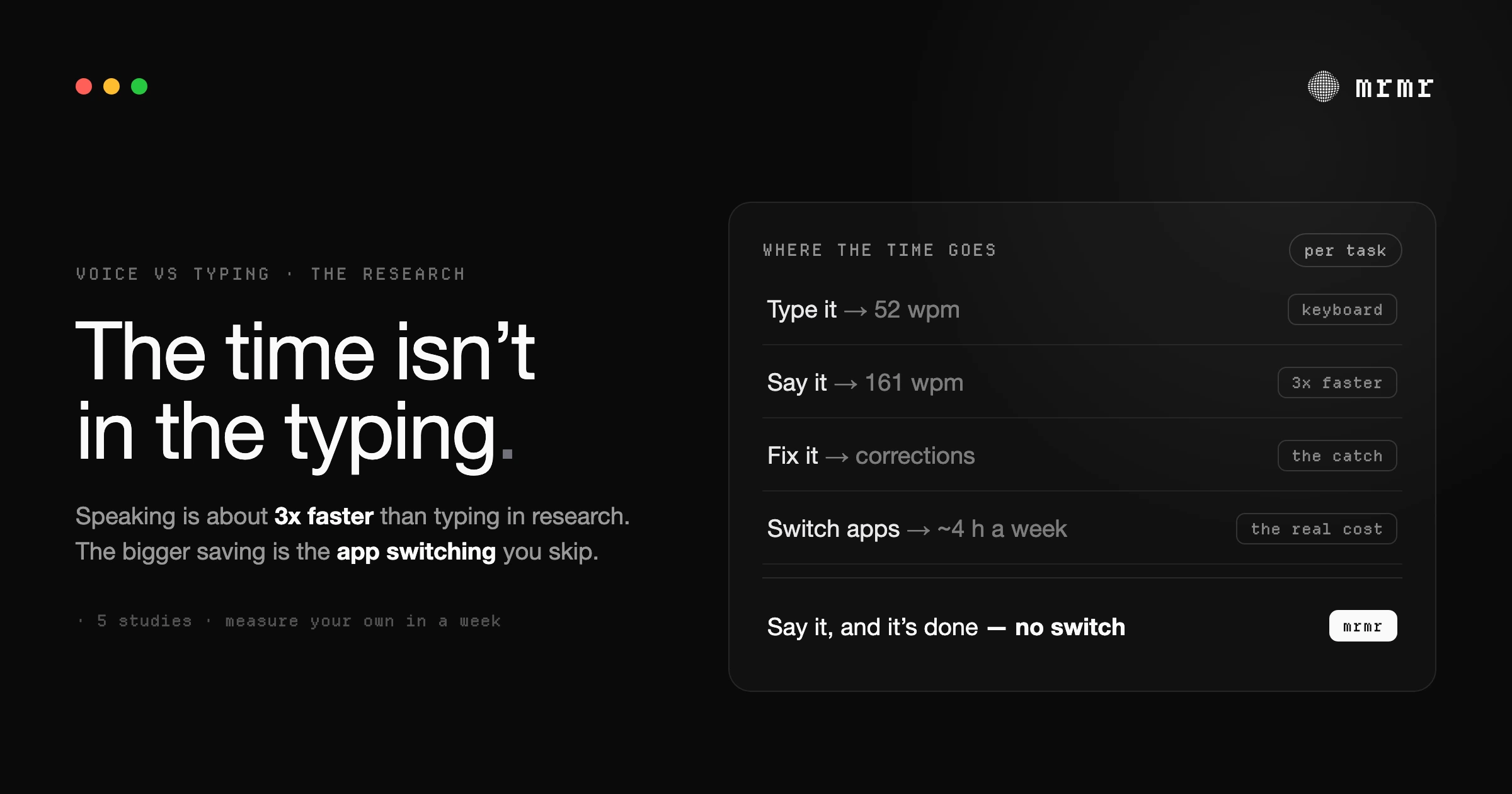
TL;DR: Yes, usually, but not for the reason most people expect. In a Stanford study, speaking text into a phone was about three times faster than typing it. That raw speed only survives if you aren’t stopping to fix recognition errors, and on older systems correction ate more than a third of the time. The bigger, more reliable saving is everything voice lets you skip: a study of Fortune 500 workers found people toggle between apps about 1,200 times a day and lose just under four hours a week reorienting. Voice that only types saves you some typing. Voice that also acts in your apps saves you the switching. You can measure which one you’re getting in a week.
The question people actually ask before trying a voice tool isn’t “is speech fast?” It’s “will this save me time, or will it just add one more thing to manage?” That’s a fair question, and the honest answer has three parts: how fast speech is, what correcting it costs, and what happens to the work around the typing.
Speech really is faster than typing
The cleanest measurement comes from a 2016 study by researchers at Stanford, the University of Washington, and Baidu. Participants entered short phrases on a phone, once by speaking and once with the built-in keyboard. In English, speech averaged 161 words per minute against 53 for the keyboard, about three times faster, and the speech condition also had about 20% fewer errors (Ruan et al.).
Two caveats matter. The study used phones and short messages, not long documents on a laptop. And it used a modern deep-learning recognizer, which is the whole reason the result looks so different from the dictation software of the early 2000s.
For a desktop comparison point: an analysis of 136 million keystrokes from 168,000 people found an average typing speed of about 52 words per minute, with the fastest 5% above 80 (Dhakal et al.). So even a fast typist is well below conversational speaking speed. On raw input, voice wins.
Where the speed goes: correction
Raw input speed is not the same as finished text. Every word the recognizer gets wrong costs you a stop, a find, and a fix, and fixing by voice is slower than fixing by keyboard.
How much that costs depends heavily on the system. A 2003 study of 23 experienced speech-recognition users found that 37% of total task time went to correcting recognition errors, and only about half of them were actually faster by voice than by keyboard (Koester). That was an older generation of recognizers and a group of users with physical disabilities, so treat it as a ceiling on the problem, not a measurement of today’s tools. The lesson still holds: correction cost decides whether dictation saves time.
That’s why the parts of a dictation tool that don’t look like “speed” matter most in practice: a dictionary that knows your colleagues’ names and product terms, cleanup that removes filler words and false starts, and output that’s already punctuated, so the text is usable the first time.
The bigger saving isn’t typing at all
Typing is only part of the work. The rest is getting to the place where you type.
A 2022 study published in Harvard Business Review followed 137 people across three Fortune 500 companies and found they switched between apps and websites about 1,200 times a day, spending just under four hours a week reorienting after those switches, roughly 9% of their working time (Murty, Dadlani, and Das).
Switching also has a cost that doesn’t show up as minutes. In a lab study of interrupted work, people actually finished interrupted tasks faster, with no loss in quality, because they compensated by working faster, and reported more stress, frustration, time pressure, and effort (Mark, Gudith, and Klocke). You may have seen the claim that it takes “23 minutes” to refocus after an interruption; that figure comes from a 2006 interview in which Gloria Mark described her field observations of interrupted work being resumed after 23 minutes and 15 seconds on average (Gallup), not from a controlled measurement of refocusing time.
This is where the two kinds of voice tools split:
- Dictation makes the typing faster, but you still open Slack, find the thread, and paste. The switches stay.
- Voice that acts removes the trip. “Tell #design the review moved to Thursday and add it to my calendar” sends the message and creates the event without you leaving what you were doing. The time saved isn’t the 15 seconds of typing; it’s the two app switches and the reorientation after them. We go deeper on that cost in the switching tax.
Where voice loses
Voice isn’t faster for everything, and pretending otherwise is how people end up disappointed:
- Code and syntax. Brackets, camelCase, and exact punctuation are faster to type.
- Precise edits. Changing one word in the middle of a paragraph is faster with a cursor.
- Shared spaces. Open offices, calls, and trains make speaking awkward or impossible.
- Very short replies. “OK”, “thanks”, and emoji are faster to tap than to say.
- Your first week. There’s a learning curve: learning what to say, when to pause, and when to switch back to the keyboard.
Most people who stick with voice settle on a hybrid: speak the drafts and the actions, type the fixes.
Does dictation slow you down when you’re in flow?
It can, if you treat it like typing. Stopping after every sentence to check and fix the recognition breaks the flow that speaking was supposed to protect. It works better the other way around: speak the whole thought, let the tool clean it up, then fix anything wrong once at the end. Tools that remove filler words and self-corrections (“Tuesday, no, Wednesday”) on their own reduce the number of times you need to stop at all.
How to measure whether voice is saving you time
You don’t need to trust anyone’s numbers, including ours. Run a one-week check:
- Pick three recurring tasks you do every day, for example replying to a long thread, filing a ticket, and moving a meeting.
- Time each one typed for two or three days: from the moment you decide to do it until it’s done, including the switching.
- Time each one by voice for two or three days, including any corrections.
- Count the switches you skipped: every app you didn’t have to open.
- Multiply the difference by how often you do each task in a week.
If the voice column isn’t smaller after the first few days of learning, the tool isn’t saving you time, and you should know that.
How to tell if a voice assistant pays for itself
Once you have minutes saved per week, the math is simple: minutes saved per week ÷ 60 × what an hour of your time is worth, compared with the subscription. As a purely illustrative example: if voice saves you 30 minutes a week and you value your time at $50 an hour, that’s $25 a week, or roughly $100 a month, against a tool that typically costs $8 to $15 a month. The inputs are yours; the point is to use measured minutes, not a vendor’s claim.
Is it worth paying for a voice app if you already use Apple Dictation?
Apple’s built-in dictation is free and good: it punctuates automatically, has no timeout, and on Apple silicon lets you keep typing while you speak (Apple). On an M3 or later Mac with macOS 27, its more advanced dictation produces polished text (Apple). If you dictate occasionally, start there.
Paying makes sense when you hit one of three limits: you need it to know your names and jargon, you want cleanup that adapts to where you’re typing, or you want your voice to act in your apps rather than only type. The first two save correction time. The third saves switching time, which is the larger number in the research above.
Frequently asked questions
Will a voice assistant actually save me time or just add more friction? For most people it saves time once the first week’s learning curve is over, but where the saving comes from matters. Speaking is about three times faster than typing in research settings, yet correction can erase that gain. The more reliable saving comes from skipping app switches, which a Fortune 500 study put at just under four hours a week. A voice agent like mrmr targets that switching time by acting in your apps directly; measure your own tasks for a week to know for sure.
How do I measure whether voice automation is actually saving me time? Pick three tasks you repeat daily, time them typed for a few days and by voice for a few days, include corrections and app switching in both, and multiply the difference by how often you do each task. If the voice times aren’t lower after the learning period, it isn’t saving you time.
How do I prove a voice assistant pays for itself? Convert measured minutes saved per week into hours and multiply by what an hour of your time is worth, then compare that with the subscription cost. Use your own measured minutes rather than a vendor’s estimate.
Does dictation slow me down when I’m in flow? Only if you stop to fix each sentence as you go. Speaking a whole thought and fixing it once at the end keeps you moving, and tools that remove filler words and self-corrections automatically reduce how often you need to stop.
Is it worth paying for a voice-first productivity app on macOS if I already use Apple Dictation? If you dictate occasionally, Apple Dictation is enough. A paid app earns its place when you need recognition of your names and jargon, cleanup that matches where you’re typing, or voice that takes action in apps like Slack, Linear, and Google Calendar, which is what mrmr adds on top of dictation.
Try mrmr
mrmr is a voice-first AI agent for Mac, currently in private beta. Hold Fn to dictate cleaned-up text into any app, or press Fn + Left Shift and talk: it sends the message, files the ticket, or moves the meeting across Slack, Linear, Google Calendar, Gmail, Notion, and more, and shows you every write before it runs.
Join the waitlist or Book a 20-minute demo
Sources
- Ruan, Wobbrock, Liou, Ng, and Landay, Speech Is 3x Faster than Typing for English and Mandarin Text Entry on Mobile Devices (arXiv, 2016). English speech entry at 161 words per minute versus 53 by keyboard on a phone, with about 20% fewer errors.
- Dhakal, Feit, Kristensson, and Oulasvirta, Observations on Typing from 136 Million Keystrokes (CHI 2018). Average typing speed of about 52 words per minute across 168,000 volunteers.
- Koester, Performance of Experienced Speech Recognition Users (RESNA, 2003). 37% of task time spent correcting recognition errors; about half of users faster by voice.
- Murty, Dadlani, and Das, How Much Time and Energy Do We Waste Toggling Between Applications? (Harvard Business Review, August 2022). About 1,200 app toggles a day and just under four hours a week spent reorienting.
- Mark, Gudith, and Klocke, The Cost of Interrupted Work: More Speed and Stress (CHI 2008). Interrupted work is finished faster but with more stress, frustration, time pressure, and effort.
- Gallup Business Journal, Too Many Interruptions at Work? (June 8, 2006). The interview that is the origin of the widely quoted “23 minutes and 15 seconds” figure.
- Apple, Dictate messages and documents on Mac (Mac User Guide, accessed October 2026). Automatic punctuation, no timeout, and typing while dictating on Apple silicon.
- Apple, Siri AI, a profoundly more capable and personal assistant, is here (September 14, 2026). macOS 27’s more advanced dictation and its M3 / 12GB requirement.
Related reading:

